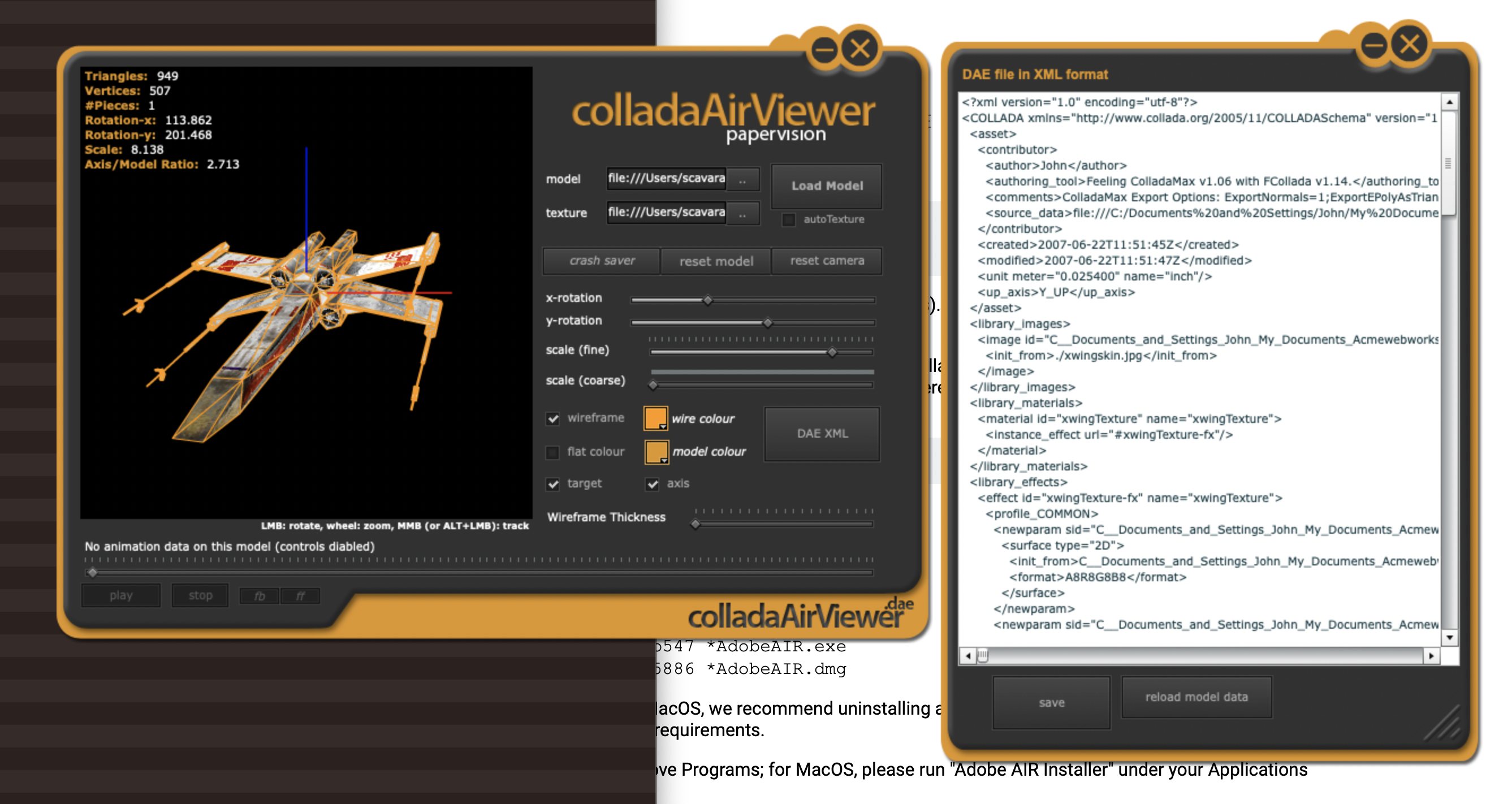
Papervision Collada Viewer (made in Adobe Air)
- by Anthony
- in Actionscript Adobe Air Flex
- posted May 9, 2009
Well, I have been stuck working on some other things lately (like trying to fix the bottom bracket of my bike 🙁 and am currently still working on my linkages tutorial. Just trying to determine how is the best way to present it (I’m new eh – Canadian for emphasis ;). In the meantime, I am going to give everyone interested in bringing 3D models into Papervision a present:
An air app that allows one to load and edit Collada animated/non-animated models!
This was a project I built in a few weeks between projects, while working as an intern at Fuel Industries. As it seems not all Collada models exported from 3D packages such as Blender, 3DMax, and Autodesk’s Maya load properly, I figured building a robust app that could install on any machine for 3D artists to test out their models before any flash/flex work would be a time saver.
Anyhow, I ran out of time and could not add some features such as undo states, loading other types of models (MD2, 3DX et cetera), and the ability to know why a model would fail to load properly. But I am going to include the entire Flex project so that if anyone wants to add any features to it go right ahead. Please feel free to comment back with the changes you have made and some code so others can build upon it, if you can.
This is the current list of features:
- load a Collada model from a local source
- scale, rotate, or orbit model using mouse controls
- ability to auto-texture
- manual texturing includes ability to turn off and on wireframe or flat colour
- ability to play through animations, frame-by-frame, or as would be expected
- ability to open up a secondary window that shows loaded models Collada .DAE data
- ability to edit and save .DAE data (in XML format).
Hopefully you can find this useful. If you do let me know.
Here is the air app with transparent windows enabled
Here is the air app with transparent windows disabled (runs better on slow machines)
Here is the entire Flex project (unzip and import existing project in Flex Builder)
And some sample Collada models
(And if you don’t have the Air framework installed already you will need it before you can install any Adobe Air applications. Get it here: http://get.adobe.com/air/ )
Enjoy! 🙂
NOTE: If you are having troubles building the project make sure to check out which version of Flex Builder you are using. I did not update FB3 while building this so the line in the ColladaAirViewer-app.xml is
You may have to change it to:


Comments
Dan
July 7, 2010 at 1:55 pmAwesome! Very Handy, thanks for doing this.
Aljosa
August 6, 2010 at 7:45 amgreat tool! it’ll reduce working time on testing dae objects a lot.
wayne
November 11, 2010 at 7:24 amhi
great app, thanks. do you know of any reason my export from blender works in your viewer but will not show in flash. The 3d file loads in and is on teh stage at the correct size (traced the min max x etc) but no objects or even wire frame?
anthonyScavarelli
November 28, 2010 at 8:19 pmSorry it has taken so long to reply. Collada’s are very fickle when using this library. Basically it only supports bone animations and polygonal meshes. If there is anything else present it will not load properly ( if there are no animations present, in Maya I would make sure all history is deleted before exporting – haven’t tried Blender yet).
Unfortunately I wasn’t able to add any error-checking into this. Basically it just lets you know it will or won’t work in flash … that tough part is that you have to troubleshoot it 🙁
Sergei Vikos
January 8, 2011 at 8:36 pmMany thanks! great tool, great interface!
lattimore
April 13, 2011 at 9:02 amExcellent!
Darmowe Kasyno
April 29, 2011 at 7:25 pmI don’t usually reply to posts but I will in this case, great info…I will bookmark your site. Keep up the good work!
Diestrin
October 4, 2011 at 8:37 pmHi there!… Awesome project. I’ll ask you if i can use your example to inspire my new project of 3D Render? Twitter: @diestrin Thanks a lot!
anthonyScavarelli
October 6, 2011 at 6:31 amDefinitely. I haven’t updated this in quite some time but if it is useful go for it.
Diestrin
October 7, 2011 at 10:14 pmThanks, your work is awesome! I’m making two diffrent projects, one of 3D Render in AIR, en the other is a viewer (like this), adapted to Android… If you want to see it, visit http://artedesonar.blogspot.com/2011/10/skp-viewer-para-andorid.html, and if you want, i can put a link to your blog.
Luis Fernando
October 24, 2011 at 7:07 amMan, I didn´t manage to run it properly, it opens as a SWF file and the screen gets all white when I try to open a DAE file… here the interface like on the images above doesn´t appear. 🙁
I´d be much thankful for any kind of help.
=)
Geri
December 1, 2011 at 4:53 pmHi Anthony,
Thank you for all of this work. I am a industrial/interior designer and I am trying to learn Python and AS. Your work will be a great help to me.
Geri
Dariusz
December 30, 2011 at 9:19 amHi – thanks for Your work! I’d like to use some of your models in my educatioal application (public school in Poland) (especially Star Wars models).
Is it possible?
Thanks for reply
Dariusz from Poland
anthonyScavarelli
December 30, 2011 at 10:07 amDefinitely! To be honest none are my models – just some I found online. I believe there are no problems using them though. The zip of models should have any licenses that I could find with them. Good luck!
tecnotic
January 4, 2012 at 6:48 amHi,
I am a teacher from spain and I was trying to download your colladaairviewer applicantion, but unfortunatley links dont work now. Please could you give another link to download the stuff.
Thanks
Raúl
anthonyScavarelli
January 4, 2012 at 9:08 amAh sorry Raúl when I changed my site I must have missed this. The links work now. Good luck!
tecnotic
January 8, 2012 at 6:37 pmMany thanks.
Cheers
Mikkel Sandberg
February 7, 2012 at 12:19 amHi! This program works pretty well, but for some reason it has does not want to load models exported from Maya 2011 that have animations on them. I made as simple of an animation as i could with as low poly count as i could manage; a plane bending in half. It will load other exports just fine that do not have an animation attached. I’m just wondering if someone could shed some light on this for me. Thanks! It is a really clean, crisp program regardless.
anthonyScavarelli
February 7, 2012 at 12:45 pmHmm I haven’t touched this program in a couple of years but I believe it may have to do with a newer version of Collada being exported. In the samples I provided it is listed as version=”1.4.1″ at the top of the XML .dae file. Try viewing the collada using a text editor and see what version is being exported.
Otherwise Collada animation was very fickle in Papervision as per 2009 when I built this. Perhaps the source project I provided needs to have a newer version of Papervision used?
This is the only advice I have as I apologize it has been quite a while since I have looked a this project.
Mikkel Sandberg
February 8, 2012 at 3:32 amperfectly understandable. Thanks for everything!